
Odoo 20 added a third, "light" license type.
In settings next to User and Administrator there is now Light, priced at £7 a user a month ex VAT in the UK against £18 to £41 ex VAT for a full user. Odoo's pricing "more info" link describes what a light user gets simply, but it leaves out the full mechanics, and the mechanics decide whether a given person can be licensed as Light at all.
We read the Odoo 20.0 source, community and Enterprise, and tested the role on a scratch database with the main apps installed. This is what we found.
How Odoo decides who is Light
There is no Light user group and no Light access rule anywhere in the code. Odoo computes the Role field from the groups the user holds, making it dynamic.
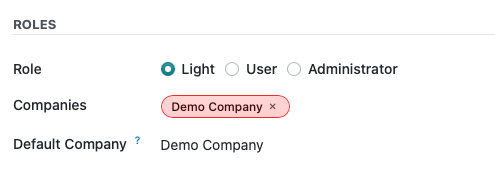
A user is Light when two things are true. They hold the internal user group, and every other group they hold is on a whitelist that each app declares in its code. The whitelist has 73 entries in 20.0. Seven are app User groups: Time Off (Employee), Attendances (own records), Referrals, Lunch, Planning, Quality and Barcode. The other 66 are feature toggles with no app of their own, such as lots and serial numbers, multiple locations, variants, price-lists, units of measure, discounts and shop floor settings.
Everything else makes the user a full User. Inventory User, Sales User, Purchase User, Project User, Timesheets User, Product Manager and Contact Creation are all outside the whitelist. Grant any one of them and Odoo sets the Role to User. Thus triggering a license change and potentially, a cost change. Odoo's documentation says so in one line: "a Light user is automatically upgraded to a User role if they are granted access beyond their default reduced permissions." The licence check reports the result, so the upgrade shows up on your bill.
In practice this means you cannot make someone Light by hiding menus or trimming a form. Only the group list sets the role.
What a Light user can do
The table below is what we verified on Odoo 20.0 with a user holding only the default Light groups. "Own records" means the access rule limits them to records linked to their own employee or user.
| App | A light user can | Limits we measured |
|---|---|---|
| Barcode (needs the Barcode User group) | Receive, deliver, move stock internally, scrap, pack, work in batches, run stock counts, create lot and serial numbers at goods in, print delivery slips | No Inventory app. Cannot choose a carrier or press Send to Shipper. Cannot be assigned a count request |
| Time Off | Request own leave and allocations | Edit only until the request is validated |
| Attendances | Check in and out, see own attendance records | Edit only until the record is validated |
| Expenses | Record own expenses | Own employee only, draft state |
| Appraisals | See and fill own appraisals and goals | Others only as their manager |
| Employees | Browse the directory and departments, edit own skills and resume | Everything else read only |
| Planning and Field Service | See own published shifts and open shifts | No editing, no draft shifts |
| Referrals | Dashboard and own referral points | |
| Lunch | Order meals | Edit only until the order is confirmed |
| Knowledge | Read articles | Cannot create or edit an article |
| Documents | Upload and edit files in own My Drive | Shared folders by permission only |
| Quality (needs the Quality User group) | Create and pass quality checks | Role stays Light with this group added |
| Point of Sale | Work the till as a cashier under an employee PIN | No Point of Sale back end |
The root menus a Light user sees on a broad install are Knowledge, Documents, Planning, Employees, Appraisals, Attendances, Referrals, Time Off, Expenses and Lunch, plus Barcode when that group is added. They do not see Discuss, Inventory, Sales, Project, Helpdesk, Payroll or Settings.
Barcode is where a warehouse saves most, because each operative on it costs £7 instead of £18 to £41. We validated a receipt with new serial numbers, delivered the reserved serial and applied a count as the Light user. All three worked. So for staff who are really specific in their roles this is great, but for staff whose responsibilities stretch, they may still need a Full user (and actually I'd probably recommend that anyway).
What a Light user cannot do
- Open the Inventory app. The Inventory menu needs Inventory User, which is a full licence.
- Create a quotation, a purchase order or a manufacturing order, or post an invoice. Each needs its app's User group.
- Log timesheets. The Timesheets group called "User: own timesheets only" is not on the whitelist, even though Planning is. A technician can see their shifts as a light user but cannot book time against them.
- Edit a product or a contact. Both are read only. A light user can edit their own contact card and nothing else.
- Choose or change a delivery carrier, or press Send to Shipper. The carrier model is readable only by Inventory User. A label still prints when a light user validates a delivery whose carrier was set upstream, because that step runs with elevated rights.
- Use Discuss. Odoo hides the chat icon from light users. The code comment reads: "a light user does not chat, its conversations are handled for it." Chatter on records they can open still works.
- Use the Technical menu, even in debug mode.
- Hold an API key for longer than one day. Full users get the one month option, administrators one year or never.
- Open their own payslip in the back end. There is no access row for it. Odoo lists payslips under what employees get, so expect them as sent documents rather than through the Payroll app.
- See a Calendar app. Meeting records stay readable and writable through other screens, but the menu and the preferences tab are gone.
What the subscription agreement bills
The Enterprise Subscription Agreement version 13, dated 24 September 2026, defines a Light User as "any user account indicated as active and designated as a Light User in the Software, or any active employee record (from the human resources App) not linked to an active non-portal user account."
Odoo bills employee records. If you keep staff in the Employees app who never log in, every one of those records is a chargeable Light user from the moment the database is on Odoo 20. The Employees app reports the count to Odoo in the licence check. Thirty shop floor staff with no login is £210 a month. On Odoo 19 the role does not exist and those records are free. An upgrade to 20 makes them chargeable from the first licence check. You can have Employees on the system for free, just as long as there is no email address associated to the Employee. They have to be "Not Invited" as below.
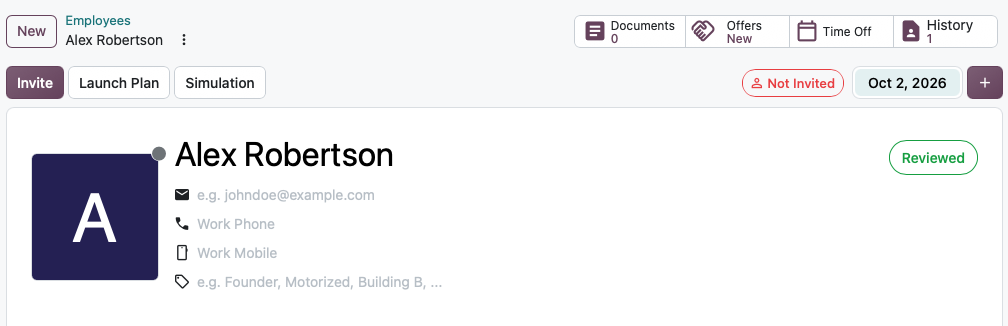
Odoo bills a role change at list price. Section 5.1 charges the list price for any extra Users for the remainder of the term. A Light user who is handed one extra group becomes a full user on your next bill.
Shop Floor is uncertain. The pricing page lists the Manufacturing Shop Floor under what light users can do as employees. A reviewer on Odoo's documentation repository wrote in pull request 20164, merged on 28 September 2026, that Odoo had removed the shop floor light user. Treat Shop Floor as employee PIN access until Odoo confirms otherwise.
Who fits the role
Light fits a job that uses only one of the whitelisted apps. That covers warehouse operatives on Barcode, field technicians on Planning who do not log time, staff who only book leave, clock in, record expenses and read the knowledge base, and shop floor and till staff who work under an employee PIN.
Light does not fit a warehouse manager who corrects stock in the Inventory app or fixes a customer address. Nor does it fit anyone who raises a quote or a purchase order, or who logs time.
How to set one up
- Either open the user from Settings, then Users, and set Role to Light on the Access Rights tab, or open the employee in the Employees app and click Send invitation. The first route removes any group outside the whitelist and keeps the nearest light equivalent. The second creates a light user from the work email, or links an existing user with that email instead of creating a duplicate, and gives it only the light groups from your default access template. On our test install that was Attendances, Time Off, Referrals, Lunch and Planning. Barcode User and Quality User have to be added by hand.
- Check the Role column in the Users list. Filter on Light and compare the count with your Odoo order.
- Before an upgrade to Odoo 20, list employees without a linked user and archive the ones who should not be billed.
Light users are only sold through an Odoo advisor, not through the self service pricing page. If you are scoping a move to Odoo 20 and want the user list checked against the code rather than the pricing page, we do that as part of every quote.
Sources
- Odoo Enterprise Subscription Agreement, version 13, sections 2, 3, 5.1 and 6.1
- Odoo pricing, United Kingdom
- Odoo 20 documentation, Manage roles
- Odoo 20 documentation, Barcode
- Odoo 20 release notes
- Odoo documentation pull request 20164, the shop floor review comment
- Odoo 20.0 source,
odoo/addons/base/models/res_groups.pyandres_users.py, and each app'smodels/res_groups.py